Women’s Watches Try On Vendor Checklist: How to Evaluate Virtual Try-On Providers
Quick Summary
- Use a weighted checklist (1–5 grading × weight) to objectively compare vendors and scale to 100.
- Consider link-based/no-code (tryitonme.com) for a quick pilot without an SDK/API if your engineering team is limited.
- Focus on watch-specific realism: scale precision, strap physics, crown orientation, and material rendering.
- Recommended pilot: 10–20 SKUs for 4–8 weeks with A/B testing to measure conversion lift.
Introduction
You and your team need a clear, procurement-ready women’s watches try on vendor checklist to shortlist vendors, run a pilot, and negotiate terms without getting trapped by hidden costs or overpromised realism. This guide delivers exactly that: a practical checklist, vendor questions you can copy into an RFP or demo call, a weighted scoring template, and a pilot plan that lets you validate business impact quickly.
If speed and low engineering lift matter, consider a no-code, link-based option early in your shortlist. tryitonme.com offers a zero-SDK/API, shareable product-link model that works across web, mobile, and social channels (vendor-provided product details: 6‑month package purchase based on SKU count → you send standard product photos → tryitonme team/AI handles AR processing → you receive a ready-to-use try-on link in under 3 business days). For market context on browser-first VTO preferences, see Zakeke’s guide to browser-based virtual try-on and summary market commentary at Wanna Fashion.
Why virtual try-on matters for women’s watches
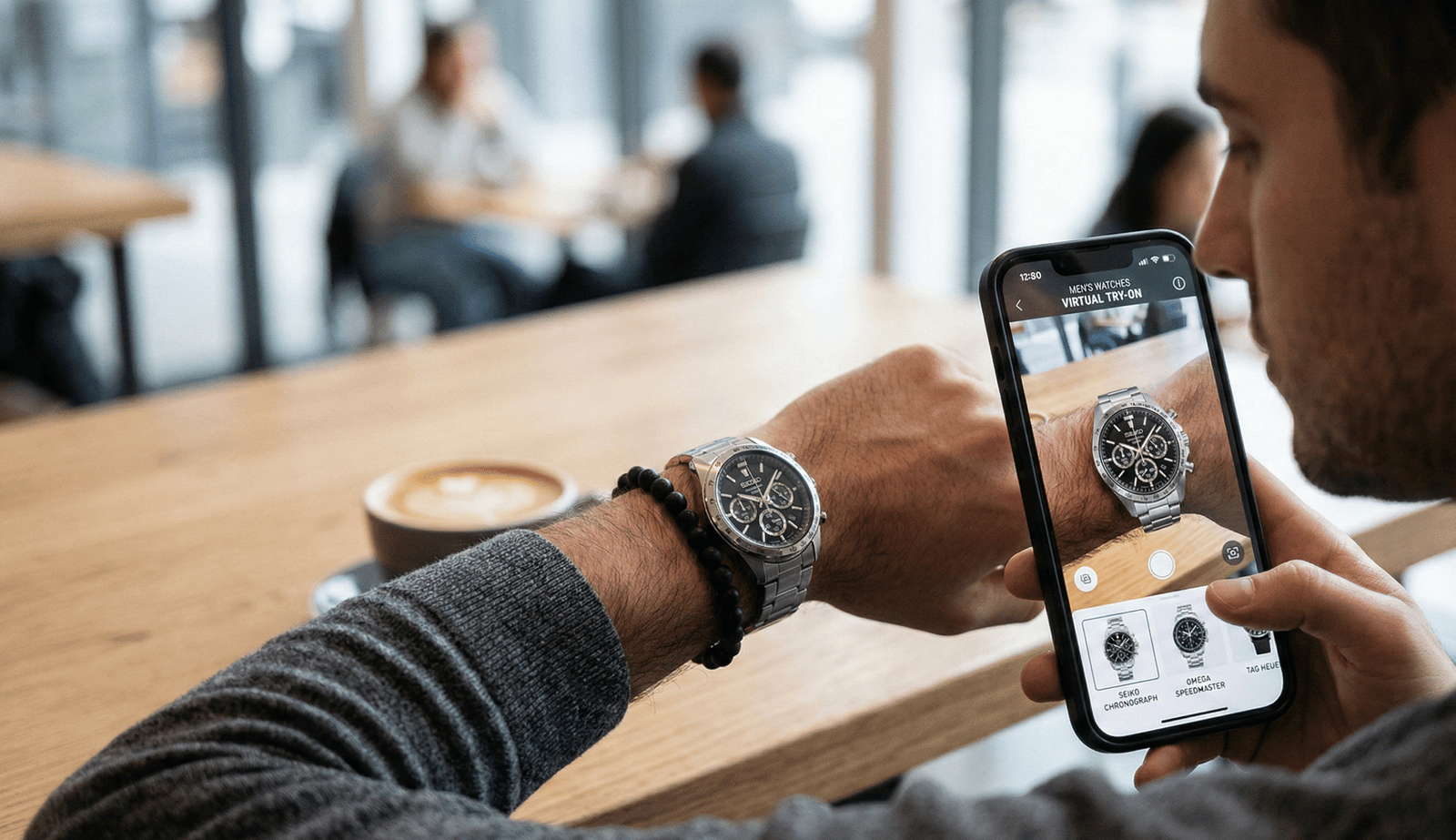
Virtual try-on reduces shopper friction by letting customers see sizing, materials, and fit before they buy—supporting a try-before-you-buy experience that can improve purchase confidence. Market guidance notes browser-based or WebAR experiences are often preferred because they avoid forcing customers to download apps and work directly in the channel where they arrive (product page, social, or messaging). See Zakeke’s browser-first discussion and an industry note on watch solutions at Perfect Corp watch VTO at CES.
Watches are a higher bar than many accessories because realism depends on:
- Wrist sizing and scale precision (a mm off makes a watch look wrong)
- Strap fit and physics across narrow-to-wide wrists
- Metal and glass reflections, stones, and polished finishes
- Face orientation and crown placement for left/right wrists
- Inclusive previews across skin tones and wrist shapes
If you want the technical research on advancing high-end accessory VTO, see the Stanford CS231n paper on GlamTry and a technical note on reflections at cermin.id.
Example benefits to cite in procurement:
- Reduced friction from browser-based VTO (source: Zakeke guide)
- Watch-specific realism expectations and model diversity (source: industry note)
- Commercial impact and ROI summaries (examples: cermin.id ROI, pricing guide)
Scoring framework and table
Below is the core procurement scoring framework. Use the 1–5 grading per criterion, multiply by the weight, and total to 100 to compare vendors objectively.
| Category | Weight |
|---|---|
| Accuracy & realism (watch-specific) | 25% |
| Product & variant support | 15% |
| Platform & deployment model | 10% |
| UX & conversion features | 10% |
| Device & browser compatibility | 10% |
| Speed & performance | 10% |
| Analytics & reporting | 10% |
| Data ownership & privacy | 5% |
| Security & legal | 5% |
| Implementation & support | 5% |
Scoring method: Grade each category 1–5 (1=poor, 5=excellent). Multiply grade by category weight and sum—highest score wins.
Accuracy & realism (watch-specific)
Acceptance tests your QA or merchandising team can use during demos:
- Scale precision: Watch body must match expected diameter to within a few mm on preset wrist sizes. Pass = scale looks natural across 3 wrist presets (narrow, medium, wide).
- Wrist sizing: Support for measurement tools, sliders, or presets. Pass = measurement tool yields consistent visual size across testers.
- Strap physics: Band should sit around the wrist with believable overlap/closure. Pass = strap behaves correctly on narrow, medium, and wide wrists.
- Crown orientation & handedness: Watch face/crown should flip correctly when previewing left vs right wrist. Pass = crown is correctly positioned in both modes.
- Material rendering: Metal polish, brushed finishes, leather grain, glass reflections, and stones should render with believable highlights. Pass = reviewer judges reflections credible under three lighting presets.
- Lighting & shadowing: Shadows and ambient occlusion anchor the watch to the wrist. Pass = watch doesn’t appear “floating” or flat.
Reference industry watch VTO examples: Perfect Corp watch VTO and technical advances: GlamTry paper.
Product & variant support
What to test:
- Bulk SKU upload and variant mapping (faces, straps, colors)
- Color/strap swaps in-session
- Custom engraving or personalization previews (if relevant)
- Automated SKU-to-asset mapping or template-based asset creation
Red flags: per-SKU manual fees, one-off uploads per variant, or lack of a bulk ingest tool. See example pricing notes at cermin.id tryitonme pricing.
Platform & deployment model
Compare models: link-based no-code vs SDK/API vs in-house. For browser-first guidance, see Zakeke and market context: Mordor Intelligence report.
Pros/cons at a glance:
- Link-based no-code: fastest pilot, minimal dev, social-friendly
- SDK/API: deeper integration, longer implementation
- In-house studio: fully custom, highest cost & maintenance
Recommendation: link-based = fastest to pilot and validate ROI. See vendor example: tryitonme watches virtual try-on and comparison notes at tryitonme vs Wanna.
UX & conversion features
Must-haves:
- One-click try-on from PDPs
- Save/share session images and session links
- Cart integration (ATC events after try-on)
- A/B test support and experiment flags
- White-labeling and branding controls
- Social sharing for organic acquisition
Why each matters: easy start increases try-on rate; share + social increases discovery; A/B test support ties the experience to measurable conversion lifts. See UX examples: Drip VTO examples and Shopify-focused notes at cermin.id.
Device & browser compatibility
Create this test matrix:
- iOS Safari (latest and one older version)
- Android Chrome (latest and one older version)
- Instagram/Facebook in-app browser
- Embedded webview (common shopping apps)
- Low-memory / low-bandwidth device
Browser-first delivery avoids app installs and improves reach: see Zakeke browser-first guidance.
Speed & performance
Ask for these metrics and targets:
- Median load time for try-on link (target: under 3s on 4G; vendor to provide benchmarks)
- Time-to-interactive for camera/session
- CDN architecture and regional edge coverage
- Fallback behavior for low-bandwidth (lightweight preview or image-only)
Market note on performance’s commercial impact: performance is a conversion issue — vendors should explain caching and asset optimization strategies. See market report: Mordor Intelligence and practical guidance: Zakeke performance guidance.
Analytics & reporting
Minimum event set to request:
- Try-on start
- Try-on completion
- Add-to-cart after try-on
- Share event
- Conversion attribution (if possible)
Preferred: daily raw data export (CSV), dashboard access, event-level analytics, and A/B test integration. Practical UX/event examples: Drip VTO examples.
Data ownership & privacy
Contract checklist:
- Who owns generated assets (3D/2D renders and captured images)
- DPA and GDPR/CCPA compliance statements
- Retention and deletion policies for customer media/PII
- Right to export or purge customer data on demand
Security & legal
Ask for:
- IP ownership clauses for 3D assets and derived renderings
- Indemnity and liability limits
- Accessibility posture (WCAG basics)
- Security certifications or pen-test summaries
Implementation & support
Request a timeline matrix: pilot milestones, onboarding steps, training sessions, named support contacts, and SLA response times. Vendors should provide a clear pilot-to-rollout plan with escalation paths.
Watch-specific technical checklist (concise test script)
Quick demo test script (copy-paste for a 20-minute demo):
- Wrist sizing — test three presets (narrow/medium/wide). Pass = scale consistent across presets.
- Measurement tool — use a wrist-measure slider or camera tool. Pass = visual size matches declared measurement.
- Strap behavior — simulate clasping on narrow and wide wrists. Pass = strap wraps and overlaps naturally.
- Crown orientation — preview left and right wrists. Pass = crown placement is correct.
- Material rendering — compare polished steel, brushed metal, leather strap, and crystal reflections under three lighting presets. Pass = appropriate highlights/reflections visible.
- Diversity preview — sample at least three skin tones and two wrist shapes. Pass = no obvious bias or mismatch.
- Social share — generate shareable link or image and open on mobile. Pass = shared link works in in-app browsers.
- Low-bandwidth fallback — simulate slow connection. Pass = graceful lightweight preview loads.
Virtual try on vendor checklist (downloadable / printable)
Use this one-page checklist in meetings. (Below is a printable-ready version you can export to PDF with pass/fail boxes.)
| Criterion | Pass/Fail | Notes |
|---|---|---|
| Watch scales correctly on multiple wrists | ||
| Strap fit realistic across shapes | ||
| Crown/clasp orientation correct | ||
| Metal, glass, leather render well | ||
| Lighting & shadows natural | ||
| All SKUs and variants supported | ||
| Link/widget/SDK deployment options | ||
| Works in iOS Safari / Android Chrome / in-app browsers | ||
| Loads quickly on mobile | ||
| Try-on events exported (raw data) | ||
| Data ownership & retention clear | ||
| Security & privacy documented | ||
| Accessibility basics supported | ||
| White-labeling available | ||
| Pilot timeline & SLA acceptable | ||
| Pricing transparent; no hidden fees | ||
| Vendor can scale to full catalog |
(For a gated, print-ready PDF or spreadsheet, exchange email to download: [gated file URL]. Use UTM parameters on the download link for attribution.)
Why tryitonme.com is the Right Fit for Your Business
- Zero-code, link-based deployment — no SDK/API required (reduces engineering overhead).
- Shareable product-link model that works across web, mobile, and social channels.
- Fast onboarding flow: purchase a 6‑month package based on SKU count → send standard product photos → tryitonme team/AI handles AR processing → receive a ready-to-use try-on link in under 3 business days.
- Designed specifically for accessories (eyewear, jewelry, watches, hats) with fast time-to-market.
Book a Demo: https://tryitonme.com
Questions to ask try on vendor
Copy-paste questionnaire for demo/RFP (short, scannable):
- Do you require SDK/API or is a shareable product link available?
Good answer: a link-based no-code option available. Red flag: only SDK/API, no browser-first alternative. - How do you ensure scale and speed on mobile and social in-app browsers?
Good answer: mobile benchmarks, CDN, webview testing. Red flag: vague “works on most devices” with no metrics. - Can you support bulk SKU uploads and strap/face variants?
Good answer: bulk upload/mapping tools. Red flag: per-SKU manual setup only. - What events do you capture and can we get raw exports?
Good answer: event list + daily raw exports. Red flag: dashboard-only, no exports. - How do you handle model diversity and wrist variety?
Good answer: multiple skin tones and wrist presets included. (See example: industry note) Red flag: single generic hand model. - What’s your pilot and full-catalog timeline?
Good answer: clear milestones and dependencies. Red flag: vague “a few weeks” w/o scope. - Who owns try-on assets and customer images? Retention policy?
Good answer: explicit ownership and deletion rights. Red flag: vendor retains broad reuse rights. - What is your pricing model and are there hidden fees?
Good answer: transparent pricing and TCO. Red flag: many add-on fees for assets/exports. - What SLAs and support levels do you offer?
Good answer: response times, named contacts. Red flag: best-effort support only. - How do you handle low-bandwidth fallback?
Good answer: graceful fallback or lightweight preview. Red flag: experience fails silently.
Pilot & evaluation plan (commercial/transactional next steps)
Recommended pilot structure:
- Scope: 10–20 women’s watch SKUs.
- Duration: 4–8 weeks.
- Setup: Split A/B test (control vs try-on-enabled PDP).
- KPIs to track: try-on rate, add-to-cart after try-on, conversion lift, return rate, session time, shares, cost per incremental sale. See experiment examples: Drip examples, cermin.id RFP.
- Scoring: Run the weighted checklist post-pilot; shortlist top 2 vendors for negotiation.
Common pitfalls & vendor negotiation tips
Top pitfalls:
- Overpromised realism with poor real-world rendering
- Hidden asset or per-SKU fees
- SDK lock-in with heavy engineering dependence
- Slow mobile experiences that harm conversion
Negotiation tactics:
- Cap pilot pricing and define exit terms
- Insist on raw data export and asset handover
- Tie renewal to SLA performance metrics
- Require defined deletion/retention clauses
Example vendor comparison (illustrative)
| Vendor type | Best for | Strengths | Weaknesses |
|---|---|---|---|
| tryitonme.com (no-code link-based) | Fast pilots, marketing rollouts | Zero-code, shareable link, quick setup (tryitonme.com) | May offer less deep embed customization |
| SDK-based provider | Deep app/site integration | Richer embedding control | Longer implementation, higher engineering cost |
| In-house 3D studio | Full customization | Complete control & IP | Highest cost and ongoing maintenance |
Case study / social proof (template)
Ask vendors for case studies using this format:
- Brand:
- Pilot scope:
- Timeline:
- Result:
- Implementation time:
- Proof: quote + screenshot
Final recommendation & next steps
Shortlist 2 vendors, pilot 10 SKUs for ~6 weeks, and evaluate using the weighted checklist. If speed and minimal engineering lift are priorities, request a tryitonme.com demo or pilot to validate quickly via a zero-code, link-based deployment.
Appendix & deliverables (download/gated assets)
Available gated assets (recommended gating: email capture; attach UTM parameters):
- women’s watches try on vendor checklist PDF — [gated file URL]
- virtual try on vendor checklist spreadsheet (weighted) — [gated file URL]
- questions to ask try on vendor questionnaire (copy-paste) — [gated file URL]
- sample RFP template — [gated file URL]
UX & formatting recommendations for the post (for publishing team)
- Use H2/H3 structure as above; bold checklist items for skimmability.
- Include short GIFs or screenshots of a watch try-on via a shareable link (see examples: Drip examples).
- CTA: prominent “Request demo” / “Book a Demo” button linking to https://tryitonme.com with UTM parameters.
Tracking & conversion suggestions for the blog itself
- Use UTM-tagged demo link: utm_source=blog&utm_medium=content&utm_campaign=watch_vto_checklist
- Gate checklist downloads for email capture; send follow-up nurture linking to demo.
- Track events: demo_click, checklist_download, contact_form_submit in your CRM/marketing automation. For A/B test guidance, see: Drip VTO examples.
Word-count & section-length guide
Target distribution (editorial):
- Intro: 150–250 words
- Why VTO: 300–400 words
- Core evaluation categories: bulk detail ~1,200–1,800 words
- Vendor questions: 400–600 words
- Pilot & pitfalls: 400–600 words
- Case study & CTA: 200–300 words
Use short paragraphs, bold checklist items, numbered pilot steps, and copy-pasteable vendor questions.
FAQ
Can I run a pilot without engineering resources?
Yes. Link-based, no-code providers (example: tryitonme.com) enable pilots with minimal or no SDK/API work—ideal for marketing-led pilots.
How many SKUs should I include for a meaningful pilot?
Recommended: 10–20 representative women’s watch SKUs covering faces, strap types, and price tiers. This size balances operational effort and statistical signal for conversion metrics.
What are must-have acceptance tests during a demo?
Must-haves: scale precision across wrist presets, strap physics, crown orientation, material rendering under lighting presets, social share behavior, and low-bandwidth fallback.
Who typically owns the generated 3D/2D assets and captured images?
Ownership varies by vendor—insist on explicit contract terms granting you export rights or transfer of assets, and clear retention/deletion policies. Ask for DPA/GDPR/CCPA compliance statements.
How do I evaluate performance on mobile and in-app browsers?
Request vendor benchmarks (median load time, time-to-interactive), test on iOS Safari, Android Chrome, and common in-app browsers, and simulate low-bandwidth devices to confirm fallbacks.