Men’s Watches Try On Vendor Checklist: How to Choose the Right Virtual Try‑On Provider
Introduction — What this checklist helps you decide
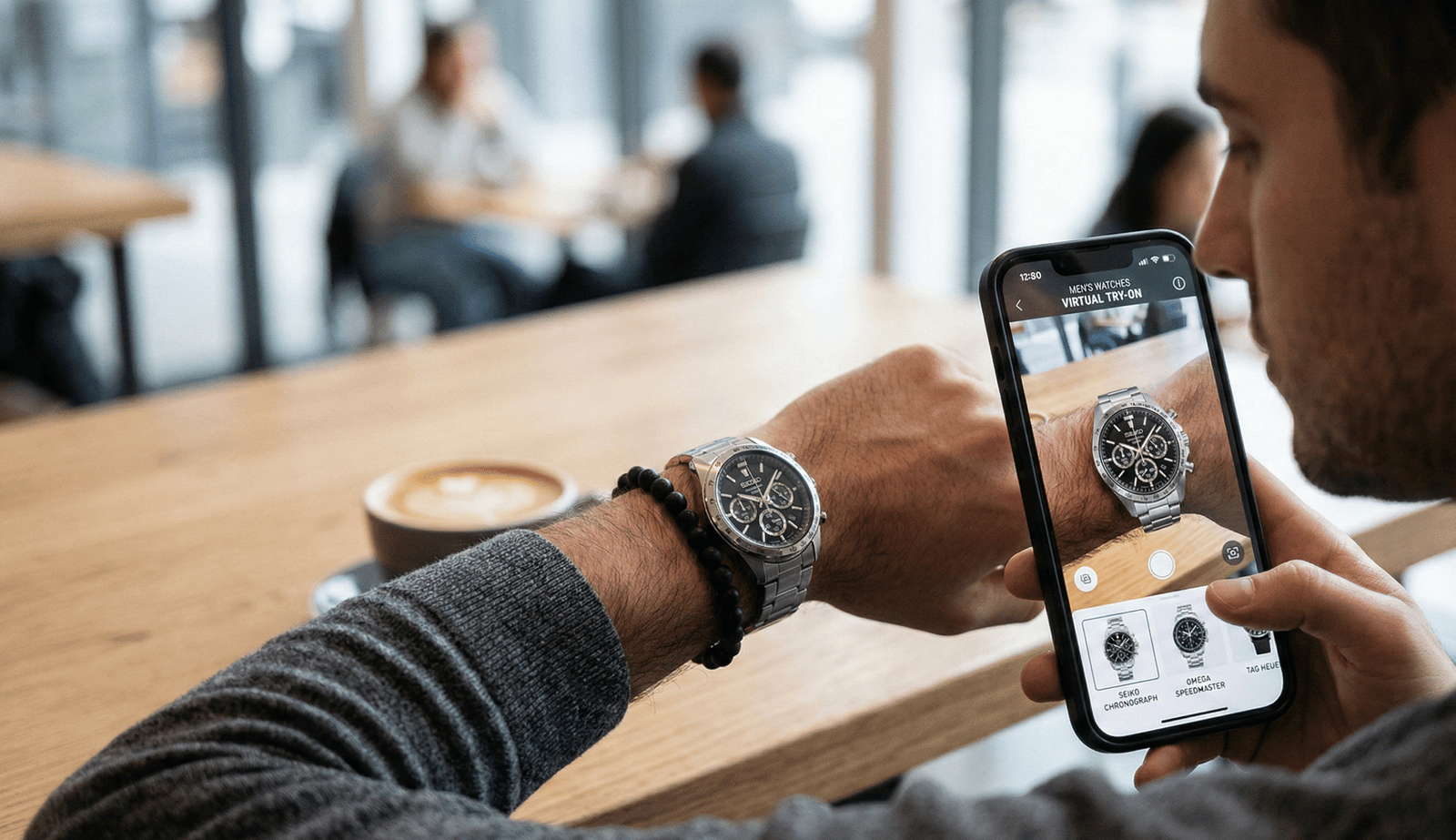
This guide helps teams evaluating a men’s watches try on vendor decide which virtual try‑on (VTO) provider to shortlist, how to run a rapid pilot, and what acceptance checks to require before a larger rollout. We cover technical realism, fit accuracy, implementation options (including fast no‑code pilots), analytics, privacy, commercials, and the exact questions to ask during demos.
Quick Summary
- Prioritize realistic rendering and clear scaling methodology (2D overlay vs 3D).
- Prefer mobile‑first providers with fast load times and graceful fallbacks; use Web Vitals guidance.
- Run a short no‑code, link‑based pilot to validate visual fidelity and conversion before SDK/API builds.
- Require analytics/CDP integration (e.g., Segment) and clear event schemas.
- Say No‑Go if pilot needs heavy engineering, pricing is opaque, or privacy answers are vague.
Executive summary — Quick decision checklist for busy leaders
If you only have 5 minutes, use these Go / No‑Go signals to shortlist vendors and decide whether to pilot:
- Go if vendor can demonstrate realistic watch rendering and explain scaling methodology (2D overlay vs 3D) with examples.
- Go if vendor supports mobile first and aims for fast load times and fallbacks (see Web Vitals guidance).
- Go if they offer analytics or CDP integration (e.g., Segment) and clear events.
- Go if a short, no‑code link pilot is available to deploy omnichannel (web, email, social). A link‑based pilot is the fastest way to validate metrics.
- No‑Go if vendor requires heavy custom engineering for a basic pilot, shows opaque pricing, or cannot answer privacy/retention questions.
- Typical pilot timeframe: expect 2–6 weeks from kickoff depending on SKU count and integration scope (see adoption guidance trends: McKinsey).
- Performance target: aim for sub‑3s mobile experience where possible; use Core Web Vitals as a benchmark.
- Quick recommendation: use a short no‑code product link pilot (fast validation route) before committing to SDK/API builds.
Want to validate fast with a link‑based pilot? We recommend running a short no‑code test to confirm visual fidelity and uptake before a full integration.
Why virtual try‑on matters for men’s watches
Watches are uniquely challenging to sell online: shoppers evaluate scale, case thickness, lug‑to‑lug, band fit, and metal finish. Poor scale or unrealistic materials can destroy trust and increase returns. Many ecommerce teams find that visual, interactive previews reduce uncertainty and support purchase confidence — AR and product visualization are widely recommended for improving shopper certainty (context: Shopify: Augmented Reality).
Key watch‑specific pain points to consider
- Scale & proportion: a 40 mm case looks different on a 6″ wrist vs a 7.5″ wrist.
- Band behavior: metal bracelets reflect light and sit differently than leather or NATO straps.
- Material realism: brushed vs polished finishes, ceramic, and leather grain must read correctly.
- Contextual fit: watches must sit and rotate naturally on a wrist, not appear “pasted” on.
The core men’s watches try‑on vendor checklist
Below are the evaluation dimensions with actionable acceptance checks. Use these in demos and procurement.
Product modeling & realism
- 2D overlays vs 3D models: ask which approach they use and why. 2D overlays are faster to produce; 3D typically yields higher realism but can increase modeling effort (overview: 2D vs 3D overview). Reference.
- Realism requirements: accurate scaling across wrist sizes, correct rotation and depth cues, crown/bracelet alignment, and distinct rendering for bracelets vs straps.
- Materials: vendor must demonstrate brushed/polished metal, ceramic, leather grain and fabric textures. Request side‑by‑side samples for your SKUs. Material example.
Acceptance check: vendor provides sample models for at least one metal bracelet and one leather strap, with a simple fidelity comparison.
Fit & sizing accuracy
- Wrist calibration options: user input (wrist circumference), reference object (credit card), or automatic calibration from photo. Look for multiple calibration methods (guidance: Nielsen Norman Group).
- Adjustable scale factors and explicit preview of case diameter and lug‑to‑lug.
- Library of wrist models: diverse skin tones, hair patterns, and wrist shapes.
Acceptance check: vendor can show calibration flow and test cases across small/medium/large wrists.
UX & interaction features
- Essential interactions: rotate, pinch‑zoom, swap bands/variants, color toggles.
- Commerce hooks: add‑to‑cart from try‑on, share to social or messaging, and UGC capture (screenshots/video). UX example.
- Friction reduction: single‑link access, minimal permissions, clear UI on placement.
Acceptance check: interactive demo supports at least rotate, band swap, and add‑to‑cart.
Performance & reliability
- Mobile performance targets: aim to keep perceived load under ~3 seconds; use Core Web Vitals as guidance (Core Web Vitals, mobile performance docs: Google Web Performance).
- Graceful fallback: static product images if AR fails.
- Cross‑browser, cross‑channel availability (in‑app browsers, social story viewers).
Acceptance check: vendor supplies measured load times on representative mobile network conditions. Performance reference.
Implementation & deployment
Integration options: SDK/API for deep integration vs no‑code shareable link for fast omnichannel tests. No‑code links dramatically cut time to pilot and allow deployment in ads, emails, story formats, and product pages. Shopify guide.
Acceptance check: vendor documents both options, with time estimates for link‑based pilot vs SDK rollout.
Catalog sync & product data handling
- SKU mapping, variant/colour sync, inventory refresh cadence, image submission specs and naming conventions, and process for adding new SKUs.
Acceptance check: vendor provides a clear catalog onboarding template and cadence.
Analytics & conversion tracking
Events to track: impressions, try‑ons, duration, add‑to‑cart from try‑on, purchases from try‑on, and returns linked to tested SKUs. Must support pushing events to analytics/CDP (e.g., Segment). Analytics guide.
Acceptance check: sample analytics dashboard or event schema.
Security, privacy & compliance
- Ask about imagery retention, consent flows, data minimization, and deletion on request. Confirm vendor compliance posture and documentation (GDPR; CCPA).
- Use ICO guidance for consent best practices: ICO.
Acceptance check: privacy policy and data processing addendum available for legal review.
Support, SLA & onboarding
- Onboarding timeline, training, uptime SLA, escalation process, and availability of a dedicated success manager or creative services.
Acceptance check: documented SLA and sample onboarding plan.
Commercials & contract items
- Pricing models to expect: subscription, per‑try, per‑SKU modeling fees, pilot pricing. Watch for hidden costs (custom integration, tuning).
- Ask about caps, termination terms, and IP ownership. Pricing reference.
Acceptance check: line‑itemed pricing and pilot terms.
Roadmap & extensibility
Confirm ability to expand across accessories (eyewear, jewelry, hats), localization, and feature evolution.
Acceptance check: product roadmap and release cadence.
Virtual try on vendor checklist (reusable template for accessories teams)
Quick RFP checklist (copy/paste lines):
- Modeling approach (2D/3D) and sample fidelity provided.
- Wrist calibration methods and sample wrist models.
- Mobile load times (measured).
- Deployment method: link vs SDK.
- Catalog onboarding template and SKU cadence.
- Event schema and CDP/analytics integration.
- Privacy & data retention policy.
- Pricing model and pilot terms.
- SLA and onboarding timeline.
- Roadmap and creative services availability.
Questions to ask try on vendor (must‑ask list for demos & RFPs)
Technical & product questions
- How do you handle scaling and alignment for watches across wrist sizes?
- Do you use 2D overlays or full 3D models? Why for our SKUs? (see 2D/3D overview: arpost).
- Can we see sample models for metal bracelet and leather strap SKUs?
- How do you render reflective metal finishes and leather grain?
- What is average latency and measured mobile load time?
Integration & deployment questions
- Is a custom SDK or API required, or can you deliver via a shareable product link?
- Typical setup and go‑live time for X SKUs? (ask for concrete timelines).
- How are catalog updates and variant mappings handled?
Data, privacy & security questions
- What user data and imagery are captured and stored? For how long?
- How is consent captured and logged? (guidance: ICO).
- Are you GDPR / CCPA compliant and can you provide a DPA?
Analytics, measurement & benchmarks
- Which events are tracked and can you push to our CDP/analytics? (e.g., Segment).
- Do you support A/B testing and provide benchmark case studies? (Optimizely).
Commercial, legal & operational questions
- Pricing model, per‑SKU fees, and pilot pricing?
- What is included in onboarding, training, and support?
- Who owns generated imagery and derived models?
- Can we terminate if pilot metrics miss agreed KPIs?
How to run a pilot and test vendors — step‑by‑step
Pilot template:
- Scope: pick 50–200 representative SKUs (adjust to catalog size). Some teams scale pilots to 200–500 SKUs where volume justifies broader testing.
- Timeline: kickoff → 2–6 weeks execution (modeling, QA, traffic). Use experimentation guidance: Optimizely.
- KPIs: try‑on rate, add‑to‑cart rate from try‑on, conversion lift, and returns on tested SKUs. ROI reference.
- QA checklist: devices (iOS/Android), browsers, lighting conditions, wrist diversity, social/in‑app viewers.
- Acceptance criteria: minimum engagement thresholds, no major privacy or performance blockers, positive direction on conversion or clear learnings to iterate.
- Analysis: compare to baseline period, attribute with A/B testing where possible.
Red flags & pitfalls to avoid
- Pilot requires heavy custom engineering or months of dev work for a single SKU.
- Mobile performance is poor or vendor cannot provide measured load times.
- Pricing is opaque or modeling fees are undisclosed.
- No analytics/events or refusal to integrate with your CDP.
- Vague answers on data retention or inability to present a DPA.
Scoring rubric & vendor selection framework
Suggested weighting (weighted 1–5 scoring):
- Accuracy & realism: 30%
- Deployment speed & ease: 20%
- UX & conversion features: 15%
- Analytics & data: 10%
- Pricing: 10%
- Support & roadmap: 10%
- Legal & security: 5%
Pass threshold: weighted score > 3.5. (We recommend converting this into a spreadsheet for procurement use — see Appendix.)
Why tryitonme.com is the Right Fit for Your Business
Why we recommend tryitonme.com as a fast validation option:
- ZERO‑CODE, LINK‑BASED deployment: shareable try‑on links remove the need for SDKs and speed omnichannel testing (web, social, email). See: tryitonme.com. Reference.
- Fast onboarding & turnaround: vendor process — customer purchases a 6‑month package by SKU count; sends standard product photos; tryitonme.com team/AI handles AR processing; customer receives a unique try‑on link in under 3 business days. (Vendor: Contact).
- Accessory‑focused rendering: purpose‑built for accessories (watches, eyewear, jewelry, hats).
- Speed & pilot suitability: shareable link approach enables quick pilots across channels without heavy engineering.
- Analytics & support: integrates event tracking and offers onboarding support; confirm specifics with vendor legal/SLA docs before signing.
Book a Demo — Request a no‑code pilot or a demo here: https://tryitonme.com/contact
Contract negotiation checklist & next steps
Key contract items to confirm before signing:
- SLA: uptime, maintenance windows, and credits.
- Support: response times, escalation, dedicated success manager.
- Data ownership & retention: who owns images and derived models; deletion on request.
- Pricing caps: overages, per‑SKU fees, modeling fees, and termination penalties.
- IP & usage rights: usage of generated assets for marketing or analytics.
Implementation timeline template (roles)
- Product: define success metrics and SKU list.
- Creative: prepare photos and variant assets.
- Engineering: CDP & site integration (if required).
- Vendor: modeling, QA, and link delivery.
- Analytics: event wiring and dashboards.
- Legal: DPA and contract review.
Case studies & illustrative pilot scenarios
Illustrative example (anonymized):
- 4‑week pilot, 75 best‑selling watch SKUs, link‑based deployment to mobile product pages and social ads.
- Measured outcomes: increased try‑on engagement and a positive direction in add‑to‑cart rate on tested SKUs (illustrative; results vary by brand and traffic).
Closing & CTA — Next step: run a no‑code pilot
Top 5 questions to ask immediately:
- Can you deliver a shareable try‑on link for X SKUs within Y days?
- How do you handle scaling/placement across wrist sizes?
- What analytics events are available and can you push them to our CDP?
- What data do you store and how long? Can we delete on request?
- What is the pilot pricing and termination terms?
Ready to validate quickly? Download the checklist/RFP template and request a no‑code pilot with tryitonme.com.
Appendix & downloadable assets (recommended)
Assets marketing/design should prepare:
- Gated PDF: Men’s Watches Try‑On Vendor Checklist + RFP Template.
- Editable vendor scoring spreadsheet (weighted).
- 2‑minute demo video showing link‑based deployment (script in brief).
- FAQ block covering cost, accuracy, integration, and privacy.
Writer notes & publishing checklist
- SEO: primary keyword in H1 and first paragraph; use secondary keywords naturally (guidance: Moz).
- Accuracy: verify any conversion, uptime, or compliance claims against vendor legal/SLA docs before publishing.
- Legal: flag privacy or contractual claims for legal review.
- CTAs: subtle CTA after executive summary and stronger CTAs in the tryitonme.com section and Closing.
FAQ
- How long does a typical link‑based pilot take?
- Expect 2–6 weeks from kickoff depending on SKU count and QA scope; small pilots (50–100 SKUs) often complete in 2–4 weeks.
- What accuracy can we expect for case diameter and lug‑to‑lug?
- Top vendors provide calibrated scale and adjustable scale factors; require sample comparisons and a calibration flow as acceptance checks.
- Do providers store user photos or imagery?
- Policies vary—ask vendors explicitly about imagery retention, consent flows, and deletion on request. Require a DPA and documented retention policy.
- Can we run pilots without engineering resources?
- Yes—choose vendors that offer no‑code, shareable links for omnichannel testing to validate visual fidelity and conversion before SDK work.
- What analytics should we insist on?
- Track impressions, try‑ons, try‑on duration, add‑to‑cart from try‑on, purchases from try‑on, and returns linked to tested SKUs; ensure events can be pushed to your CDP (e.g., Segment).
- How should we score vendors?
- Use the weighted rubric above (accuracy, deployment speed, UX, analytics, pricing, support, legal). Aim for a weighted score > 3.5 to pass.
If you’d like the gated PDF checklist, editable scoring spreadsheet, or a 2‑minute demo script next, say which asset to prioritize.