
Jewelry Try On Webflow: How to Embed a Virtual Try‑On on Your PDP
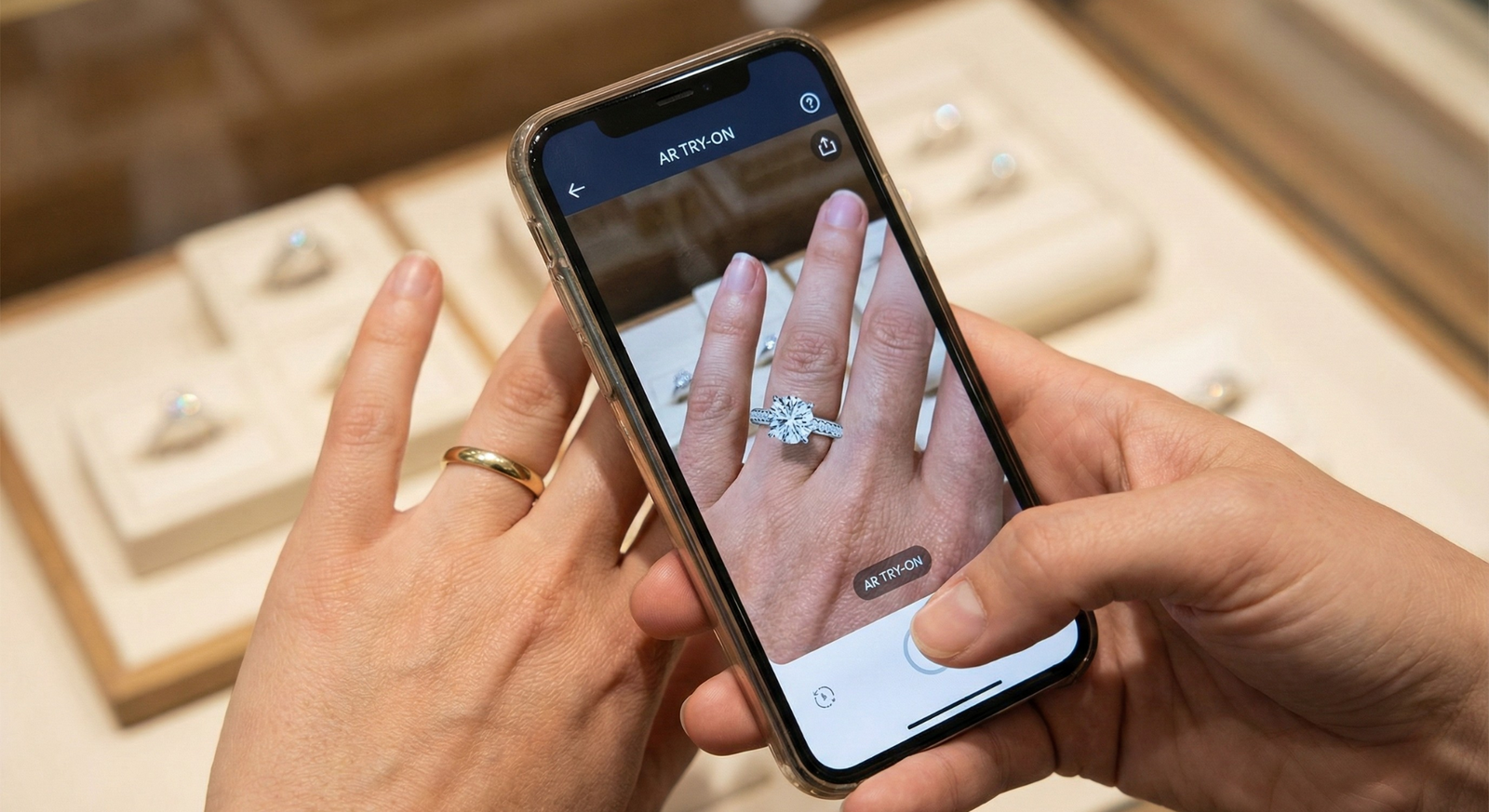
- Add a no-code virtual try-on experience to your Webflow product pages using link-based VTO.
- Four integration patterns: inline embed, modal, direct link, or sticky CTA — start with a PDP button and then upgrade to a modal if needed.
- Recommended provider: tryitonme.com (link-based, no-code) for quick access and reuse across channels.
What this guide covers and who it’s for
Who: Webflow store owners, generalist devs, and merch/ops teams who understand Webflow basics but haven’t yet implemented AR/VTO. Deliverables: action templates (inline embed, modal, direct link, sticky CTA), copy-ready code snippets, QA checklist, and analytics examples for a jewelry rollout try on Webflow. For context on AR adoption, see Think With Google — Augmented Reality Shopping.
Quick primer: What is virtual try‑on for jewelry (benefits for ecommerce)
Virtual try-on (VTO) allows shoppers to see how a ring, necklace, bracelet, or hoop looks on them using a camera or an uploaded photo. The benefits of ecommerce are obvious:
- Increase buyer confidence and reduce doubts
- Increase engagement on the PDP
- Potentially increase conversions by shortening the decision-making process
- Reduce returns due to style uncertainty
AR & 3D commerce summary: Shopify’s AR & 3D commerce guide.
Why tryitonme.com is the Right Fit for Your Business
tryitonme.com is a no-code, link-based virtual try-on platform for accessories, built for rapid deployment across web, mobile, and social. Highlights:
- ZERO-CODE, LINK-BASED: one link per SKU — no SDK/API.
- Fast time to market: tryitonme’s team/AI handles AR processing (typical ~3 business days).
- Easy onboarding & scaling: 6-month plan per number of SKUs, then insert the link in Webflow.
- Reusable across channels: the same link can be used in emails, social media, and landing pages.
Implementation reference articles: tryitonme jewelry — Cermin.
Onboarding steps (copyable)
- Purchase a 6-month package based on the number of SKUs.
- Submit standard product photos (jewelry: clear front image; eyewear: front + side if necessary).
- The tryitonme team/AI processes the AR assets.
- You will receive a unique try-on link per SKU within ~3 business days.
Start creating product links: tryitonme.com — price details: pricing (Cermin).
Prerequisites: What you need in Webflow and on tryitonme
- Webflow project access with edit rights for the Product Template (PDP).
- Product Detail Page template or static product pages.
- Webflow CMS collection (recommended) for product records.
- CMS field for Try-On URL (e.g., “Try-On URL”).
- Tryitonme account and created product links for each SKU — tryitonme.
- Webflow Knowledge Embed element: Webflow University — Embed.
- (Optional) Google Tag Manager for analytics: GTM devguide.
Choose an integration approach (compare patterns)
Choose a pattern based on your UX goals and speed. Webflow interaction guide: Webflow Interactions. Recommended starter pattern: PDP button near Add to Cart; upgrade to modal for a richer experience.
- Inline embed on PDP (embed try on webflow)
- Modal overlay triggered by a PDP try on button (pdp try on button)
- Full‑page redirect to the tryitonme link (fastest)
- Sticky/floating CTA for mobile (high visibility)
Platform‑specific guides (reuse across stores): Jewelry Try On — Shopify (Cermin).
Step‑by‑step: Inline embed on Webflow PDP (embed try on webflow)
- Create the tryitonme product link for the SKU — tryitonme.com.
- In Webflow, open the Product Detail Page template.
- Add an Embed element in the try-on location.
- Paste the iframe snippet from try-on or the following placeholder example:
<iframe src="https://tryitonme.com/your-product-link" title="Virtual try‑on" width="100%" height="600" loading="lazy" style="border:0;"></iframe>Notes:
- Use loading=”lazy” to defer load (see MDN iframe loading).
- Wrap the iframe in a responsive wrapper (width:100%; aspect‑ratio or fixed height) to avoid layout shifts.
Step‑by‑step: Add a PDP try on button (recommended quick win)
Two quick options: direct link open and modal embed.
A) Direct link open (fastest)
- Create a CMS field called Try-On URL and fill it in for each product.
- Bind the button’s href to the CMS field.
<a class="tryon-button" href="https://tryitonme.com/your-product-link" target="_blank" rel="noopener" aria-label="Try on this product">Try On</a>B) Modal with embedded iframe
Add a hidden modal to the product template, triggering it with Webflow Interactions. Example skeleton:
<button class="tryon-button" aria-haspopup="dialog" aria-controls="tryon-modal" data-tryon-url="https://tryitonme.com/your-product-link">Try On</button>

<div id="tryon-modal" role="dialog" aria-modal="true" aria-label="Virtual try‑on" hidden>
  <button class="modal-close" aria-label="Close">×</button>
  <iframe src="" id="tryon-iframe" title="Virtual try-on" loading="lazy" width="100%" height="700"></iframe>
</div>
Accessibility checklist:
- aria-controls & aria-haspopup on button
- role=”dialog”, aria-modal on modal
- trap focus when modal is open, return focus to trigger when closed
- Esc key to close
- WAI‑ARIA dialog reference: WAI‑ARIA dialog practices
Theme edits & template rollout (embed try on webflow)
- Add a CMS Try-On URL field (if using a CMS)
- Add the try-on component once to the Product Template.
- Use conditional visibility to make the component appear only when the Try-On URL is filled in — Webflow Conditional Visibility.
- Convert the try-on area to a Symbol/Component for reuse.
- Adjust the spacing near the Add to Cart button for consistency.
No‑code vs Light‑code options (performance & UX tradeoffs)
No‑code:
- Direct link or iframe embed — fastest launch, low maintenance.
Light‑code (recommended for performance):
- Lazy-load iframes on the first click.
- Dynamically inject modal HTML to avoid initial DOM bloat.
- Track events via small JS snippets.
Example of lazy‑load JS — paste into Embed or site footer:
<script>
document.querySelectorAll('.tryon-button').forEach(function(btn){
  btn.addEventListener('click', function (e) {
    var url = this.dataset.tryonUrl || this.getAttribute('href');
    var iframe = document.getElementById('tryon-iframe');
    if (iframe && !iframe.src) {
      iframe.src = url;
    }
  });
});
</script>
Lazy loading references: web.dev lazy loading.
QA checklist (what to test before publishing)
- Functional: The try on button opens the correct tryonme link, the inline embed displays the correct SKU, the modal open/close and focus trap work.
- Cross-browser: Chrome, Safari (iOS is important), Firefox, Edge.
- Mobile: The camera request flow works (see MDN getUserMedia).
- Performance: Page load score is OK; lazy loading is active (measured via web.dev/measure).
- Privacy & secure context: The camera is only requested over HTTPS (see MDN Secure Contexts).
- Accessibility: Screen reader labels, keyboard nav, visible focus states.
- Analytics: Tryon_opened, Tryon_engaged, Add_to_cart_after_tryon events.
Troubleshooting: common issues & fixes
- Wrong SKU link: Verify the CMS Try-On URL field and trim whitespace.
- Camera blocked on iOS: Ensure HTTPS and trigger media requests from user clicks (Safari quirks).
- Slow embed: Enable lazy loading or switch to a modal/direct link to reduce page weight.
- Layout breakage: Wrap the iframe in a responsive container and set a max-width.
UX copy & placement best practices for jewelry PDPs
- Short CTAs: “Try On,” “See It On You,” “Try Before You Buy.”
- Placement: near the price/Add to Cart, below the main product image, or as a sticky mobile CTA.
- Microcopy: add a small line like “Camera required — opens in a new tab” to set expectations.
Measurement & experiments (what to track and A/B tests)
Key events (GTM recommended: GTM devguide): tryon_opened, tryon_session_started, tryon_session_duration, add_to_cart_after_tryon.
<script>
window.dataLayer = window.dataLayer || [];
function trackTryOnOpen(productId){
  dataLayer.push({
    event: 'tryon_opened',
    product_id: productId
  });
}
</script>
A/B tests recommendations: CTA copy, button placement, modal vs direct link, inline embed vs on‑demand load.
Example implementation scenarios (3 mini walkthroughs)
- Single product direct link: luxury pendant — button opens tryitonme link in a new tab (fastest). Reference pricing: Mirror necklace pricing.
- CMS store with modal + CMS field: storewide Try-On URL field and shared modal component.
- Multi-channel reuse: Use the same tryitonme link in email campaigns and social posts for consistency.
Visuals & assets to include in the post (brief for design)
- Annotated screenshot Product Template (Embed + CMS Try‑On URL field).
- GIF: click PDP try‑on button → modal/iframe load.
- Diagram: three integration patterns (inline, modal, redirect).
- Code snippet images: button with CMS binding, lazy‑load JS, dataLayer push.
Final launch checklist & post‑launch monitoring
- Before publishing: test staging, verify CMS links, test the camera on iOS/Android, validate analytics.
- Post-launch cadence: monitor daily for the first two weeks, QA weekly for the first month, then monthly checks.
Call to action & next steps
Ready to add jewelry try-on to a Webflow PDF? Create your first try-on product link at tryitonme.com or book a demo to see the flow in action.
On‑page SEO checklist (quick)
- Title includes primary keyword: Jewelry Try On Webflow.
- Primary keyword in the first two sentences.
- Use secondary keywords naturally: virtual try on webflow, embed try on webflow, pdp try on button.
Deliverables after approval
- Full draft with screenshots & code snippets (this doc).
- Downloadable implementation + QA checklist PDF.
- 2–3 headline variations and 2 meta description options.
Additional references (useful further reading)
FAQ
1. Do I need a developer to add tryitonme to Webflow?
For direct link and iframe embed options: no developer required. For performance optimizations (lazy-load, dynamic injection, analytics) or advanced accessibility, a lightweight developer is recommended.
2. How do I store try-on links per product in Webflow CMS?
Create a CMS field of type URL (e.g., “Try-On URL”) and then populate each product with a try-onme link. Use conditional visibility so that the component appears only if the field is filled in.
3. Will the camera work on iOS Safari?
The Camera API works in Safari if the page is served over HTTPS and the getUserMedia call is triggered by a user action (click). Test on staging and be aware of Safari quirks.
4. Which is better: modal or direct link?
Direct links are the fastest to launch. Modals provide a smoother UX (the user stays in the PDP) but require a bit of JS implementation and attention to accessibility/focus management.
5. How do I track try-on usage in analytics?
Use dataLayer pushes for events like tryon_opened and tryon_session_started and send them to GTM/GA. An example snippet is provided above for trackTryOnOpen.
6. Does Tryitonme support link reuse in emails and social media?
Yes—Tryitonme links are shareable and can be used in emails, ads, and landing pages for a consistent experience.